
A Symbolic Experiment – Part 4: Tree Structures
Up to this point, this series of blogs on computer algebra within SymPy have scraped the surface, looking at some of the basic problems that can arise and the primitive or atomic methods that can be used to manipulate certain pieces of an expression. Hopefully, along the way, a new appreciation for the talents and faculties that even ordinary people have in recognizing patterns within the symbols of algebra has also been obtained.
Starting in this blog, we begin to dig much more deeply into the SymPy tree-structure and the syntactical rules that can be used to manipulate it. These manipulations will be more structural and not mathematically semantic. As an example of the distinction, we will be looking at ways to modify and rearrange the tree and its contents without ever asking if it is mathematically legitimate to do so.
There are three basic areas to develop a facility with:
- Being able to detect if any two tree structures are the same
- Being able to detect that a specified pattern exists within a larger tree
- Being able to rewrite some portion of the tree.
When used together, we should be able to direct or guide the computer to rewrite expressions of arbitrary size into other expressions based on some prescribed specifications. This type of direction or guidance should not be confused with automatic term rewriting such as encountered in a rule-based system. In this latter case, deep questions about whether such automatic rewriting converges to a normal form (defined as the final, unchanging result) from repeated application of the rules arise and are quite difficult to settle. Our aims are much more modest; we simply want a set of tools that can allow us to dictate what should be done in the rewriting without having to perform the individual steps by ourselves.
In this blog post, we’ll explore the first basic step. We’ll defer the other two steps to future blogs.
The first step in understanding the tree structures that underly an expression is to recognize that mathematically equivalent expressions need not result in the same tree structures. This is a point quite distinct to the ‘special cases’ that arise when trying to work with exponentials or square roots.
The second step in understanding the tree structures is to also recognize that SymPy will sometimes mask the first rule by carrying out certain simplifications before constructing the final tree representation.
To illustrate these two points, let’s look at six sets of mathematically equivalent expressions: 1) Pure Addition, 2) Pure Multiplication, 3) Square of a Pure Expression, 4) Mixed Addition, 5) Mixed Multiplication, and 3) Square of a Mixed Expression.
Pure Addition
The first set of mathematically equivalent expressions deal with how addition of multiple terms are processed and represented:
\[ a + b + c + d = d + b + c + a = b + d + a + c = \ldots \; . \]
No matter which of the 24 possible permutations are entered, SymPy automatically sorts the input strings and provides the same tree structure. For instance, $\text{expr1} = a + b + c + d$ gives the tree
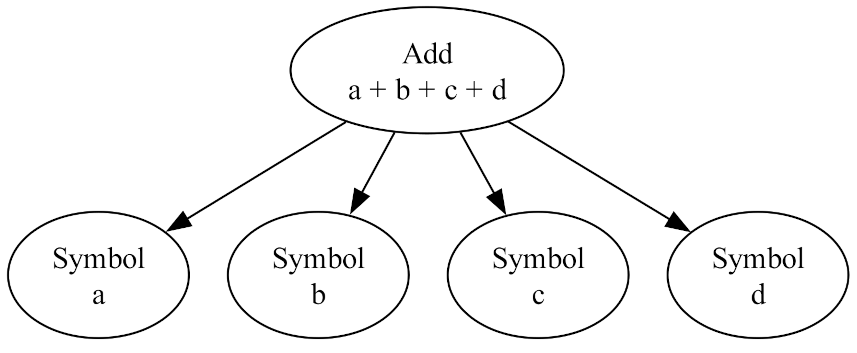
and $\text{expr2} = d + b +c + a$ gives the same tree
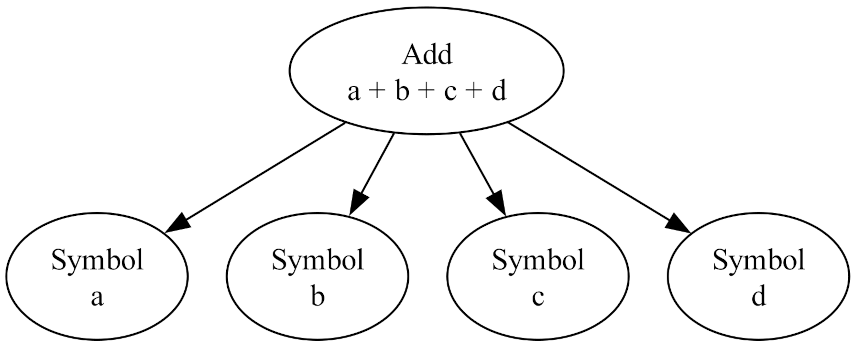
In addition we can ask is the expressions associated with each are recognized by SymPy as being the same. SymPy provides several ways to do this with the most convenient being the ‘==’ operator. Thus
\[ \text{expr1} == \text{expr2} \; \]
yields True.
Pure Multiplication
In a similar way we can see that $\text{expr1} = a \cdot b \cdot c \cdot d$ and $\text{expr2} = d \cdot c \cdot a \cdot b$ yield the same tree
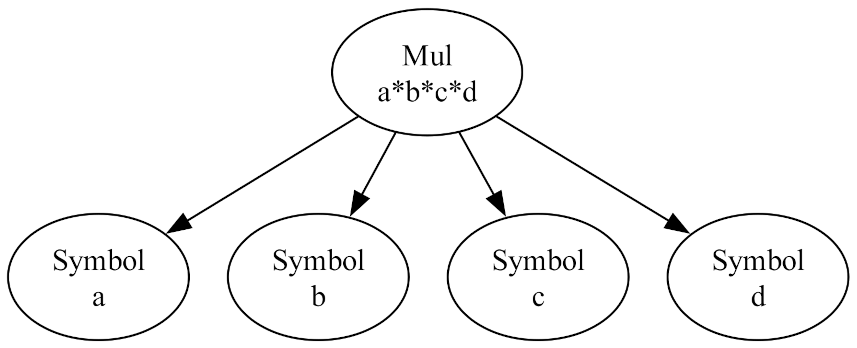
and that $\text{expr1} == \text{expr2}$ yields True.
Square of a Pure Expression
Our next example involves composing two separate functions. The expressions are $\text{expr1} = (x+a)^2$ and $\text{expr2} = (a+x)^2$, both give the same tree,
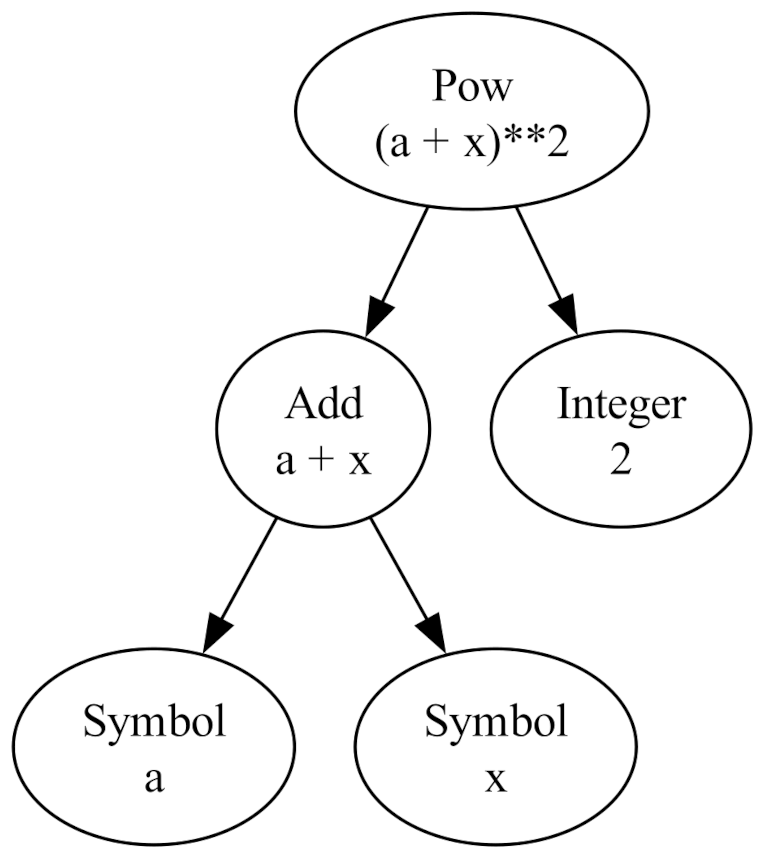
and $\text{expr1} == \text{expr2}$ yields True. Note that the presence of the Add results in another tier in the expression tree.
In all of these cases, SymPy produces the same expression tree because it sorts the input strings when the expressions are defined and the expressions are relatively simple. Thus it is able to easily determine that these mathematically equivalent expressions are also structurally equivalent using ‘==’.
In the next set of mathematically equivalent expressions, we’ll find that SymPy’s ‘==’ operator will return True only sometimes and False in others. This wrinkle will happen because the expression trees will get more complicated all because of the inclusion of a ‘-1’.
Mixed Addition
The first example involves changing the sign of one of the Symbols used in the Pure Addition case:
\[ a + b + c – d = -d + b + c + a = b – d + a + c = \ldots \; . \]
Of the 24 possibilities let’s let $\text{expr1} = a + b + c – d$ and $\text{expr2} = -d + b +c + a$. Evaluating each of these gives the same tree
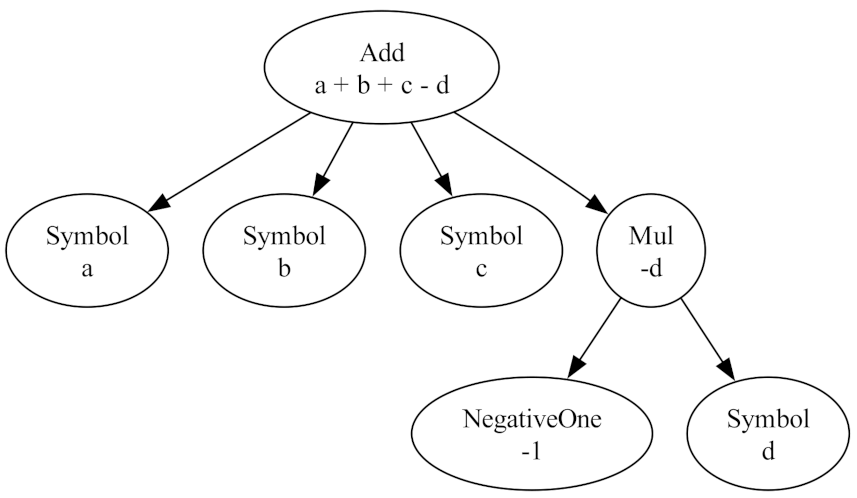
While SymPy does sort the symbols note that the ‘d’ is at a lower level with the SymPy function Mul occupying the same level that ‘d’ had in the previous version since the presence of a minus sign automatically creates a mixed tree that has more functions than Add.
Nonetheless, $\text{expr1} == \text{expr2}$ yields True since the two expressions are both mathematically and structurally equivalent.
Mixed Multiplication
In this next example, we let $\text{expr1} = -a \cdot b \cdot c \cdot d$ and $\text{expr2} = b \cdot a \cdot c \cdot (-d)$. SymPy once again sorts the inputs and produces the same expression tree for each one:
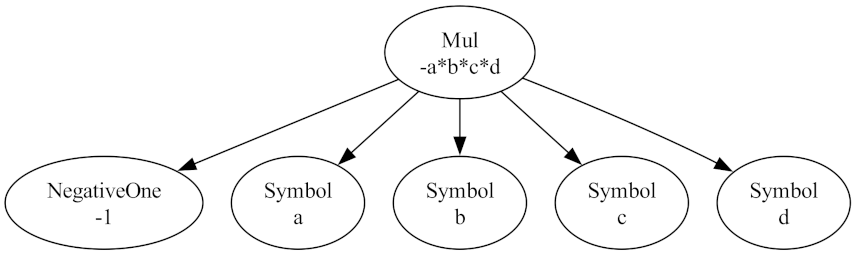
Note that here, because $-a = -1 \cdot a $, the tree that results is only different in one single term – the addition of the NegativeOne symbol in the tree. And, as expected, ‘==’ yields True when operating on both expressions.
Square of a Mixed Expression
The final set of mathematically equivalent expressions are
\[ (x-a)^2 = (a-x)^2 \; \; .\]
Regardless of the class of objects that $x$ and $a$ are (i.e., whole numbers, integers, real numbers, complex numbers, matrices, etc.) this identity holds since one can factor out a $-1$ from either side which squares to the identity:
\[ (a-x)^2 = ((-1)(x-a))^2 = (-1)^2 (x-a)^2 = (x-a)^2 \; .\]
However, the tree structure associated with each term is different. The expression $\text{expr1} = (a-x)^2$ has the tree structure on the left while $\text{expr2} = (x-a)^2$ has the structure on the right.
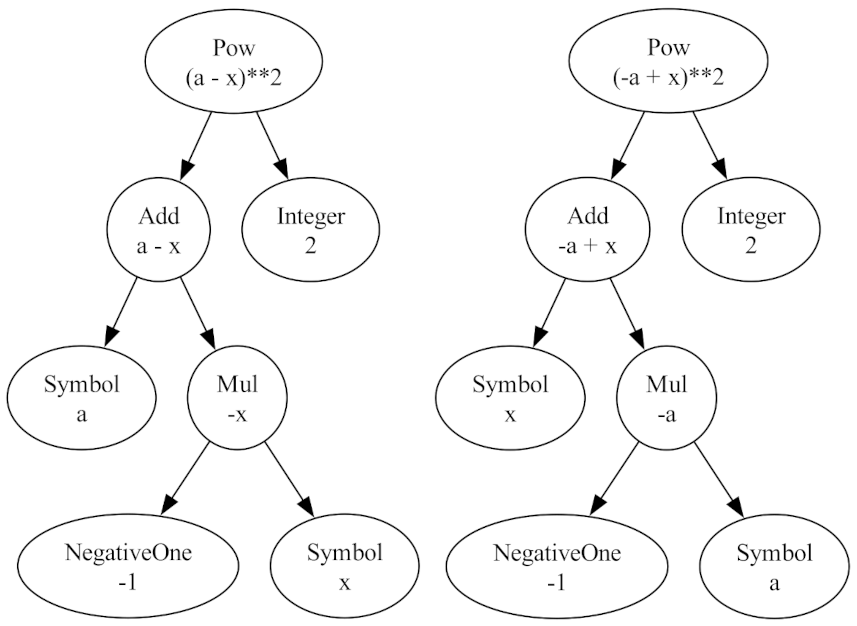
Since the tree structures are different, $\text{expr1} == \text{expr2}$ yields False. There is a way to demonstrate that they are mathematically equivalent by evaluating $\text{simplify( expr1 – expr2)}$ to zero.
Unfortunately, simplify isn’t a silver bullet. First, since it throws a complex set of primitive simplification techniques at an expression following a heuristic it doesn’t allow us to find small differences in a tree structure (like that above) so it doesn’t help when we want to make a ‘surgical’ change. SymPy’s simplification is like a sledge hammer in comparison. In addition, it isn’t guaranteed to work. So, we need to have ‘==’ in the toolbox.